Payouts are how money from card transactions gets deposited into your nominated bank account, and this is handled directly by Stripe.
To control how often you get paid by Stripe, please log into your Stripe Dashboard. From there, you'll be able to configure the payout schedule and look at your upcoming payouts + a history of past payments (along with a host of other info).
In your Stripe dashboard, you'll also be able to do other tasks like changing your nominated bank account, add additional users to access your facility's Stripe account, etc.
Log in to your Stripe dashboard and navigate to Balances to check whether you have any Available Funds ready for payout.
If your payout schedule is set to Manual, you'll need to manually transfer the funds to your bank account. If you'd prefer payouts to be sent automatically, you can update your payout schedule to Automatic in your Stripe settings.
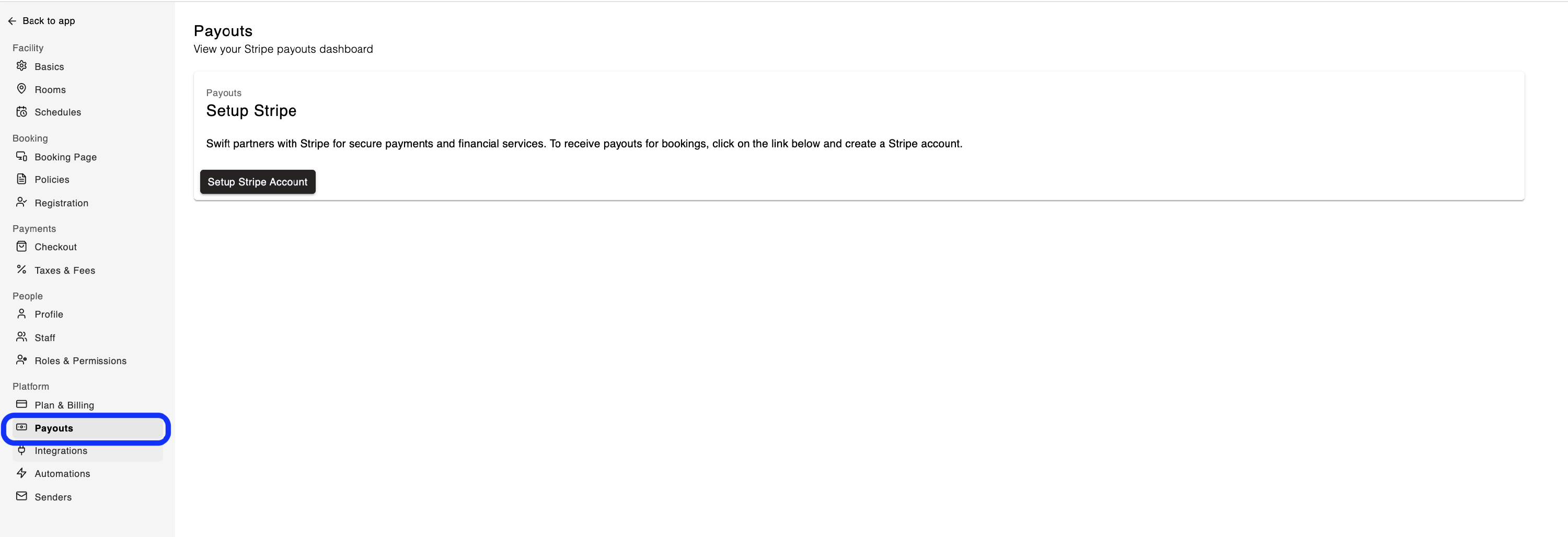
The Payouts page in Swift provides an easy link to your Stripe account. You can visit it by navigating to Settings > Payouts,
Bank related delays - Bank processing can be delayed by weekends and holidays. Once the bank has finished processing your payout, the funds will be deposited into your account automatically.
Account verification issues - Check the Dashboard and your email to see if additional information is required to verify your Stripe account. A payout may be paused by Stripe if they need further information to verify your account.
Manual payout schedule - When you first create your Stripe account, the payout schedule may be set to Manual by default. To receive available funds automatically, update your Payout Schedule to Automatic in your Stripe dashboard: How to change Stripe payout schedule
You can update your account details or add a new bank account using the Payout settings in the Stripe Dashboard.
If you're having trouble updating your Bank Details in Stripe, please contact Stripe Support: https://support.stripe.com
To view more details in regards to each Payout, you can view it from your Stripe dashboard. By clicking into each Payout, you will see a list of transactions that have been included in the payout, the date of the transactions and the fees that have been deducted.
It's not possible to pay coaches or instructors directly through the Swift or Stripe platform.
Any payments to coaches or instructors will need to be manually handled outside of Swift, by the facility. That said, you can use Pay Rates and the Payroll Report to have the system calculate what each instructor is owed, making it easier to manage payments on your end.