Time slot restrictions help you control when customers can book so your schedule stays manageable and your resources are ready. Common uses include:
Prevent Booking Too Far in Advance: Sometimes you don’t want customers booking months in advance. A time slot restriction lets you set a maximum advance booking window — for example, only allowing bookings within the next 14 days. This keeps your schedule flexible and manageable.
Create a Booking "Buffer": You might need time to prepare for a session, travel to a location, or don’t allow same-day bookings. A time slot restriction can block last-minute bookings — for instance, preventing bookings within 24 hours of a session. This ensures you have enough time to get ready.
Time slot restrictions are created at the service level, so you will need to set this up for each individual service, should you wish to do so. The time slot restriction is found in the Advanced Settings section of each individual service,
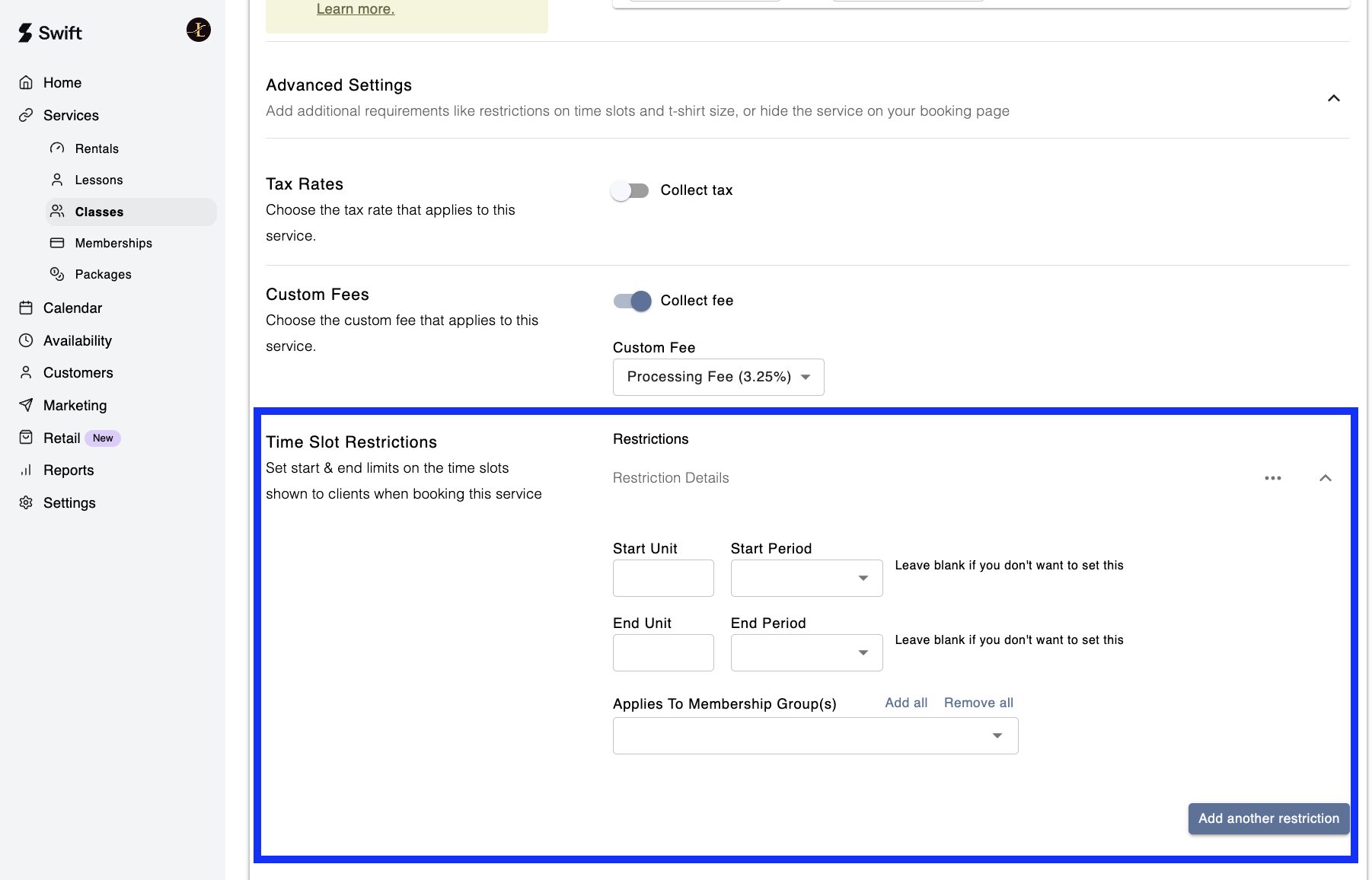
If your instructor needs at least 5 hours to get to the facility, you can set the Start Period to hours and the Start Unit to 5. This will prevent customers from booking any time slots within the 5 hours leading up to a scheduled session, ensuring enough time for travel and preparation.
Or, if you don’t want to allow any same day bookings, you’d set a Start Unit and Start Period of 24 hours. These settings help manage last-minute bookings and provide a buffer for your instructors and resources.
To limit how far in advance someone can book, you can use the End Period and End Unit settings. These allow you to control the maximum of the booking window, ensuring customers cannot book beyond a certain time frame.
For example, you don't want customers booking beyond 30 days out, so you would set the End Period to days and the End Unit to 30. This will prevent customers from booking any time slots more than 30 days ahead of the current date (today’s date).
Note: You can choose to set either a Start Limit or End Limit, or both. Setting both is not required to create the restriction, giving you flexibility in how you manage your booking window.
Similar to how pricing is setup in Swift, you can create different time slot restrictions for the public (non-members) vs. members, allowing you to give members a different window to book than the general public.
To do this, you'd create a restriction and set "Applies to Membership Group(s)" to Public (Non Members). And then you can create another restriction, assigned to a membership group or groups.