
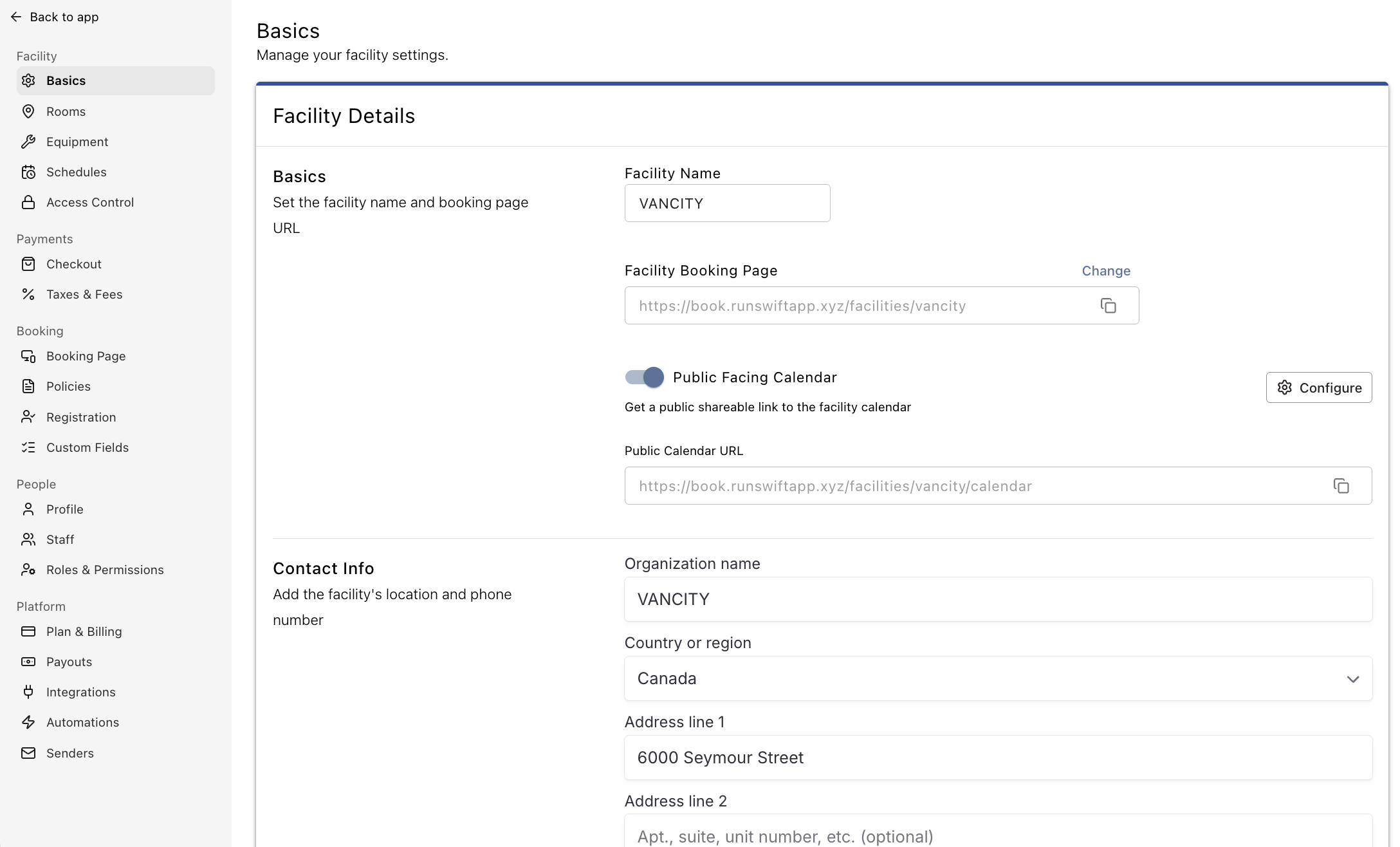
Basics
Facility Name
Set the name of your facility. This name appears on your public booking page and in booking correspondence sent to your customers.
If your facility changes its name or rebrands, update it here to keep your information consistent across Swift.
Facility Booking Page
Your Facility Booking Page is the main online destination where customers can create accounts, browse available services, make bookings, and sign in to their Swift profiles.
You'll find your booking page URL here. To customize it, click the Edit icon and enter your preferred URL.

Public Facing Calendar
Enable the Public Facing Calendar to let customers and other visitors view a read-only version of your facility's calendar without signing in to their Swift accounts.
Visitors can see when bookings take place and which spaces are occupied, helping them check availability before making a booking. The Public Calendar is not interactive, so customers are not able to make bookings directly from the calendar view.
Learn more about the Public Calendar here.
Contact Info
Enter your facility's key details here, such as address and phone number. This information will be displayed on your public booking page so ensure it is accurate.
Your facility's address is important for more than just helping customers find you. Swift also uses this address to determine your facility's time zone, which affects how dates and times are displayed throughout your facility.
If you collect tax on bookings or other purchases, make sure your address is accurate so your facility's location information is up to date.